Answer

eurail bookings

  • July 20, 2025
  • 8 replies
  • 84 views

When making bookings, I see the whole trip, book seats where necessary, then pay. The ticket only shows the paid part of trip. So do I just show my pass to get on the rest of the trains?

Best answer by AnnaB

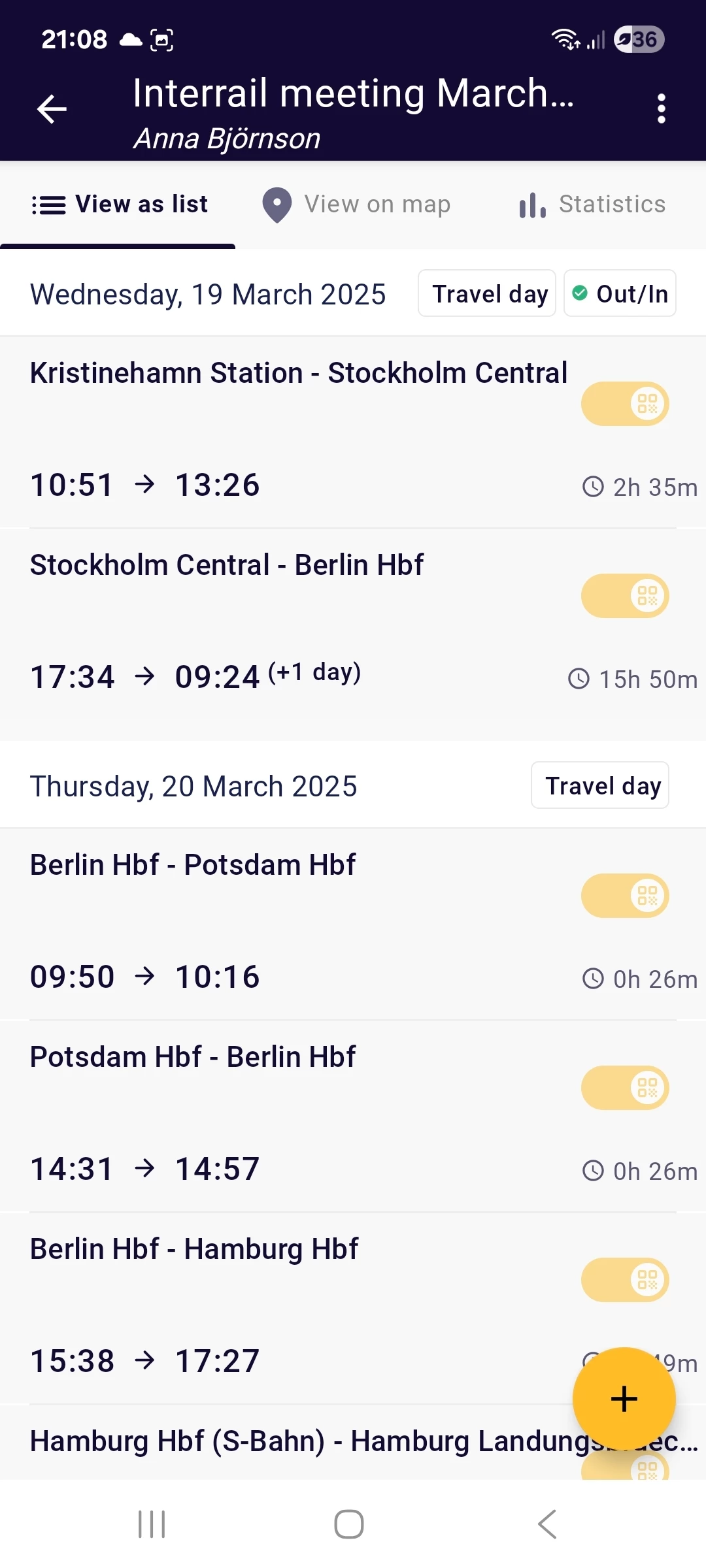
You must add all train, both those with and without reservations, as Journeys in the Railplanner app. The Journeys must be connected to the Trip that you have connected to your global pass. 


Below is an example:
 

8 replies

Forum|alt.badge.img+3
  • Keeps calm and carries on
  • July 20, 2025

@Nancy Iagnemmo 

You are not entitled to travel only with a seat reservation. You must always show your pass and add every journey in the Rail Planner app to obtain a QR code.


  • Author
  • Right on track
  • July 20, 2025

I have my pass, that part is all taken care of. 


  • Author
  • Right on track
  • July 20, 2025

My question was, when you go to book trip, you have starting point and finish point, somewhere along the booking, you might have to reserve seats, I picked our time, booked seats and paid. When the ticket came it only shows the part for the reservation of seats. So, for the rest of the trip, I'm assuming all you need to do, is board the trains you're suppose to and just show your global pass?


Forum|alt.badge.img+3
  • Keeps calm and carries on
  • July 20, 2025

 So, for the rest of the trip, I'm assuming all you need to do, is board the trains you're suppose to and just show your global pass?

Yes, you are right, but you must also show your pass if you have a mandatory reservation. In other words, you must show both: the global pass and the reservation.


  • Author
  • Right on track
  • July 20, 2025

So why doesn't the rest of the route show up, how am I to know what trains to take?


Forum|alt.badge.img+3
  • Keeps calm and carries on
  • July 20, 2025

@Nancy Iagnemmo 

To know what trains you have to take, look at the official sites or apps of the railways, it depends on what country you travel. Last minute changes are always possible in case of cancellations or delays. 

You must also add and activate your journeys in the Rail Planner app; or in the My Trip section on your Pass Cover if you have a paper pass, before boarding the train. Note that the Rail Planner app is not always accurate.


Forum|alt.badge.img+10
  • Railly clever
  • Answer
  • July 20, 2025

You must add all train, both those with and without reservations, as Journeys in the Railplanner app. The Journeys must be connected to the Trip that you have connected to your global pass. 


Below is an example:


Forum|alt.badge.img+3
  • Keeps calm and carries on
  • July 20, 2025

@Nancy Iagnemmo 

I give you an example. If you had a seat reservation for tomorrow between Frankfurt and Brussels, the timetable indicated on your seat reservation would no more be valid, as trains are cancelled due to a technical problem on the line and a change would be necessary in Cologne. You should always check the timetables before departure, in this example on Bahn.de or in the DB Navigator app.

In such cases, if you travel on trains with mandatory reservations, it would be necessary to exchange them at the station. In my example you could take another train without reservation. Unfortunately, such problems are very common in some European countries and not an exception.