Question

How will I see my outbound trip in the app?

  • July 11, 2026
  • 6 replies
  • 33 views

Hi, 
I’m new in Interrail. I’m traveling to Oslo this coming week and will be having an outbound travel day from the north to the south of NL, near the border picking up my travel companion. 
1. Do I have to book a trip to the border? Or to the nearest train station in NL to where my friend lives? 
2. How will I see that this trip is booked as one of my 3 Out/Inbound trips? 
 

Thanks, Nants

6 replies

Forum|alt.badge.img+10
  • Railmaster
  • July 11, 2026
  1. Just enter your journey in the Rall Planner app. The app will use 1 in/outbound day automatically if you travel in/to/from the Netherlands, in addition to using a travel day that is needed for all travel on the pass. It will also ask for confirmation to use an in/outbound when you add the journey to your pass. Note that you don't book anything in the Rail Planner app, you just register your journeys on the pass in it.
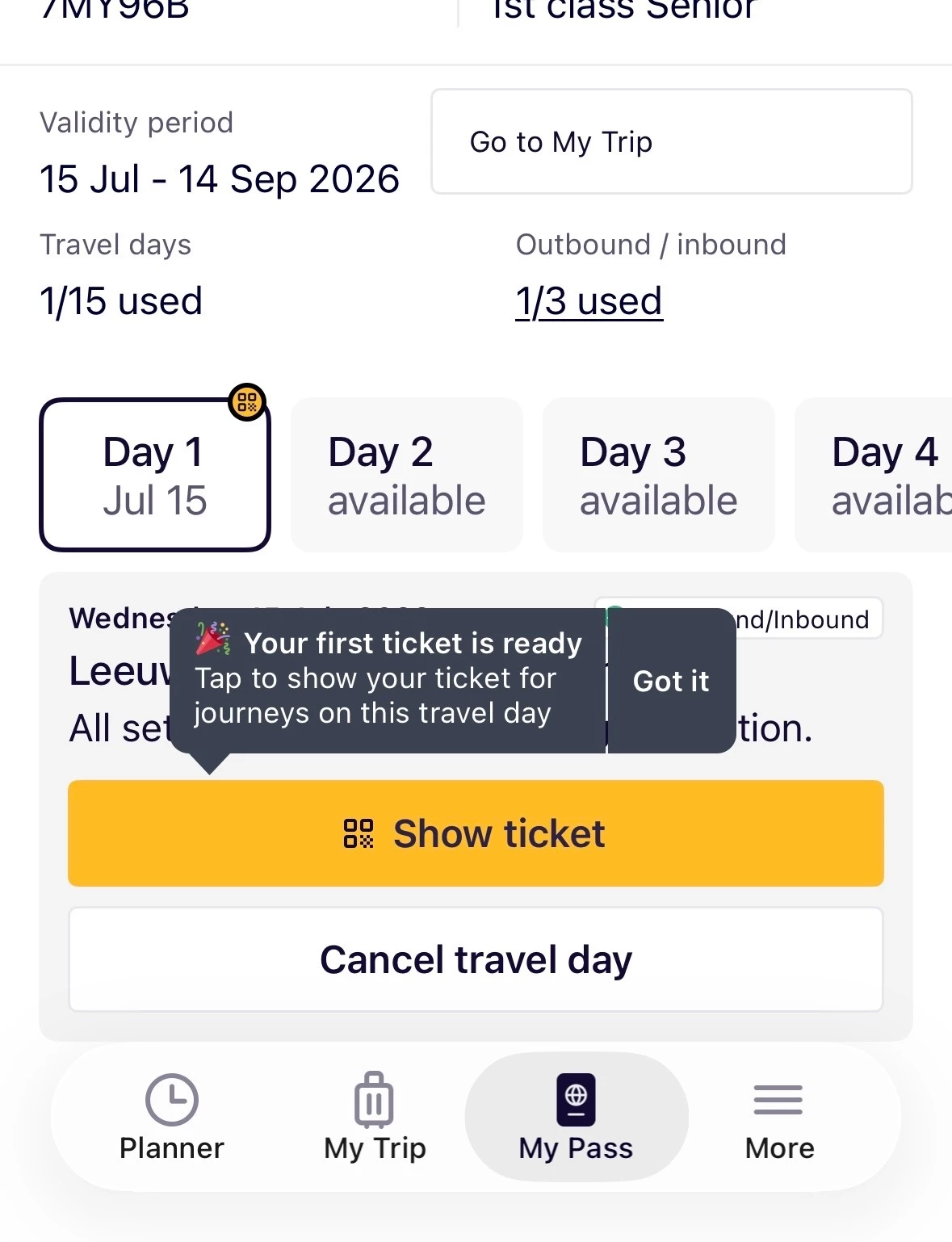
  2. In your Trip, you'll see "Out/In” next to the date. In My Pass, you'll see how many in/outbound days you have left. It will start with "0/3 used” and then "1/3 used” etc. Note that Residents of the Netherlands (and a few other countries) have 3 in/outbound days.

  • Author
  • Right on track
  • July 11, 2026

@rvdborgt Dankjewel! Thanks! 
The thing is: I did not get the confirmation question when I added the journey to the pass. So there I started doubting.
And I now also learn from you that registering a journey is not booking it. Do I have to active the pass on that Outbound day and will I then see a QR-code or such? Because on this dutch train, I don’t need to make a seat reservation. 


Forum|alt.badge.img+10
  • Railmaster
  • July 11, 2026

After activating a travel day, you will see a button "Show ticket” in My Pass. That will show the barcode for the day, with all trains listed below it. You should already be able to see that if you have already activated your pass and added a train to your pass.

Activating your pass or a travel day in advance is not recommended, but you can play around, and then cancel the activation until the day you start your trip.


  • Author
  • Right on track
  • July 11, 2026

I just activated my pass and activated my first travel day, the Outbound day in NL. 
Both (!) numbers added up! I saw: Travel days 1/15 ánd Outbound 1/3 used!
When I deactivated that travel day it all jumped back to 0/15 and 0/3. 
What’s going wrong?


Forum|alt.badge.img+10
  • Railly clever
  • July 11, 2026

Nothing is wrong. You deactivated the travel day and the numbers reset. It is recommend that you also deactivate the pass, not only the travel day. Then on the day of your departure, you activate the pass and your first journey. 


  • Author
  • Right on track
  • July 14, 2026

Thank you. 
I found out via helpdesk that I misunderstood the In/Outbound travel days. I thought they were extra travel days, just to get in and out one’s country (what was I thinking ;) ). So all clear now and good to go.