
Answer

My particular journey is in RailEurope but not in Eurail app

  • September 23, 2025
  • 9 replies
  • 98 views

Forum|alt.badge.img

I want to add a journey in my Eurail app, but that particular journey does not show up in the app. I already found that journey in RailEurope and booked seat reservations there. 

Best answer by Danhiel

@Thomas Hancock 

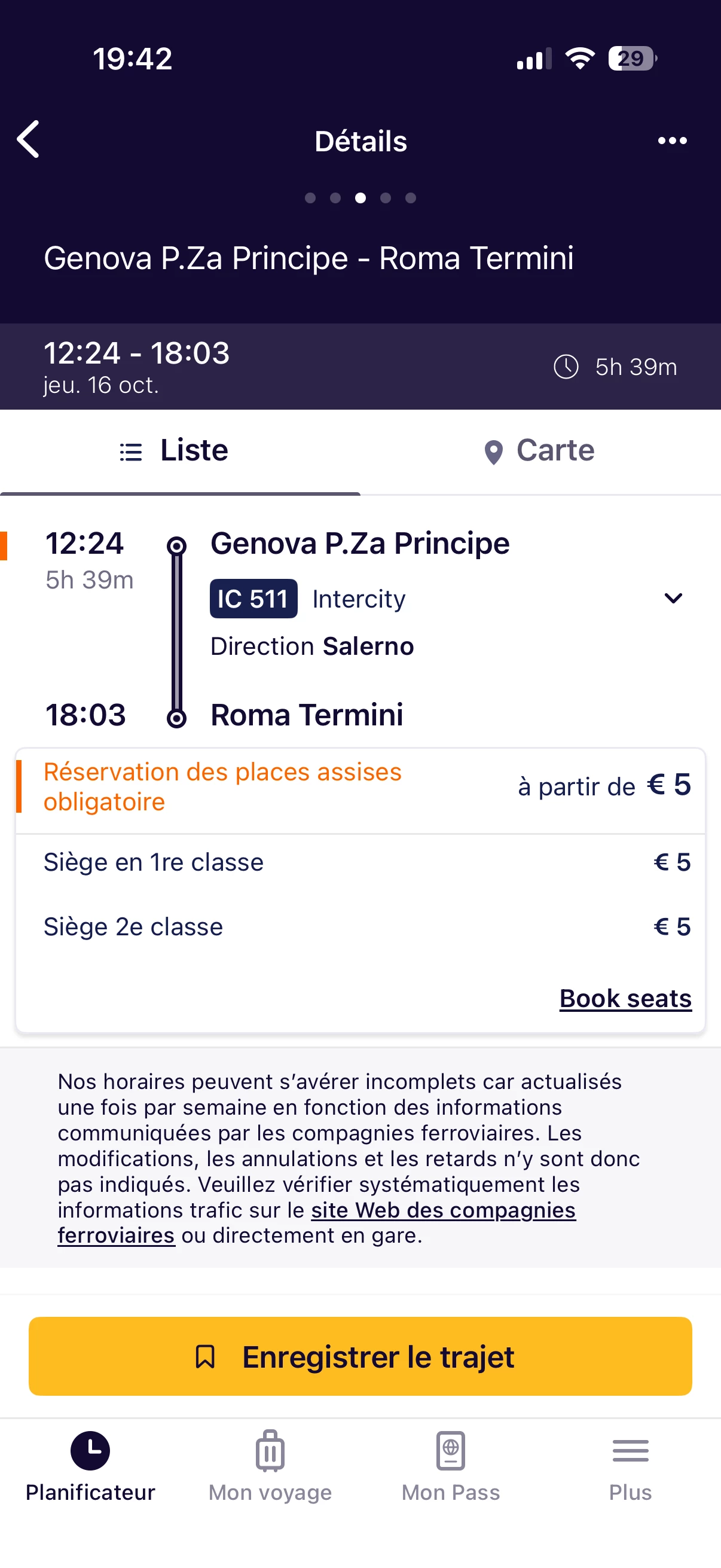
This train is available, but the arrival time doesn’t match. You should try later, the schedule will be probably updated in the Rail Planner app with the next update.


9 replies

Forum|alt.badge.img+10
  • Railmaster
  • September 23, 2025

You can always add a journey manually in the Rail Planner app if you can't find the train.

It should normally be in the app though, unless it's on 14 December or later; the annual timetable change is on that date and the data will be loaded later.

What's the train you can't find? (route, date, departure time)


Forum|alt.badge.img
  • Author
  • Keeps calm and carries on
  • September 23, 2025

Thanks so much for your help, RVD!  The journey I added in RailEurope (with seat res) but cannot find in the Eurail app: Intercity #511 on October 16, leaving Genoa at 12:24 and scheduled to arrive at Roma Termini at 18:58.


Forum|alt.badge.img+3
  • Keeps calm and carries on
  • Answer
  • September 23, 2025

@Thomas Hancock 

This train is available, but the arrival time doesn’t match. You should try later, the schedule will be probably updated in the Rail Planner app with the next update.



Forum|alt.badge.img
  • Author
  • Keeps calm and carries on
  • September 23, 2025

On my I-phone, where I keep my Planner and Trips, it does not show at all.  You think that will update eventually and the journey will appear later?  … And is RailEurope always up-to-date?


Forum|alt.badge.img+3
  • Keeps calm and carries on
  • September 23, 2025

@Thomas Hancock 

I have now the version 50.19.0 (select “More” and scroll down to find it).

Rail Europe gets the timetables from the railways, they are actual when you buy the reservations. But you should always check them again shortly before departure with the official apps of the railways, e.g. Trenitalia for Italy. Last minute changes are possible. 


Forum|alt.badge.img+3
  • Keeps calm and carries on
  • September 23, 2025

@Thomas Hancock 

I made an update to version 50.21.0, but the arrival time is still false.


Forum|alt.badge.img
  • Author
  • Keeps calm and carries on
  • September 23, 2025

--I opened my Eurail app and then scrolled down through “more”, but I could not find where I can update.

--If the conductor checks my seat res with RailEurope and then (eventually) it’s in my Eurail app they will see it’s IC #511 and leaving from Genoa--Would he/she care if the arrival time were different?


Forum|alt.badge.img+3
  • Keeps calm and carries on
  • September 23, 2025

@Thomas Hancock 

Most conductors don’t check the journeys, they scan only the QR code. If the app is not updated until you travel, it is always possible to add the journey manually.

I asked Gemini to explain you how to update an app on the iPhone:

Automatic App Updates


When this feature is enabled, your iPhone will download and install app updates in the background without you having to do anything. To save battery and mobile data, this usually happens when:

  • Your iPhone is connected to Wi-Fi.

  • Your iPhone is charging.

  • It's a convenient time, such as overnight.

This means an update might not install the exact moment it's released, but rather a few hours or a day later.


How to Check or Change the Setting


  1. Open the Settings app.

  2. Scroll down and tap on App Store.

  3. Under the "Automatic Downloads" section, make sure the toggle for App Updates is turned on (green).


Manual App Updates


Even with automatic updates turned on, you can always check for and install updates manually at any time.

  1. Open the App Store app.

  2. Tap your profile icon in the top-right corner.

  3. Scroll down to the "Available Updates" section.

  4. You can either tap Update next to an individual app or tap Update All to install every available update at once.


Forum|alt.badge.img
  • Author
  • Keeps calm and carries on
  • September 23, 2025

Thanks for being so thorough on this!