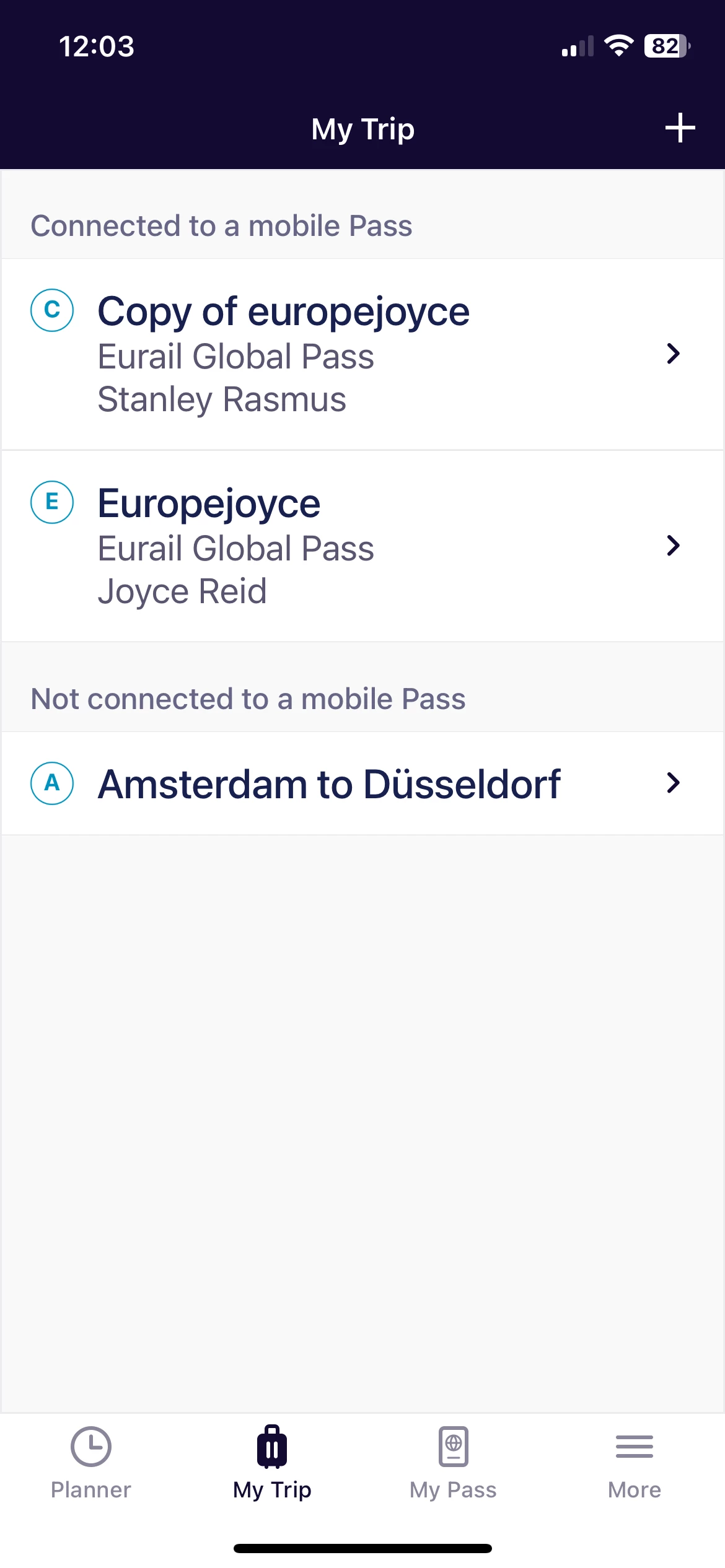
I have added two passes to my mobile phone. However I have not activated the passes. I created a trip (Amsterdam to Dusseldorf) that has all my journeys started from Amsterdam to Dusseldorf and onto Austria and finally Zurich. It says the trip is not connected to a mobile Pass.
Is it because my pass it not activated? I will only start to use the Eurail rail on 13 June. Should I activate it say next week June 1 before I fly out Amsterdam? Just worried that my mobile pass will not work before I leave Canada on June 6.
Once the pass is activated, can I then activate each train journey individually to confirm that is the train I actually want to take? Do you activate each train journey under each mobile pass ( I have 2 passes)? Or do you activate each train journey under the trip folder?
Best answer by Eurail Community Moderator
Hey @Joyce Reid! You don’t have to activate the Pass to connect a trip to a Pass.
Nevertheless, as your screenshot shows, you have created 3 trips: the 1st which is connected to Stanley’s Pass, the 2nd which is connect to your Pass, and a 3rd which is on its own and not connected to any Pass at all (Amsterdam to Dusseldorf). You can only have 1 trip per Pass, so the Amsterdam to Dusseldorf trip is not valid for generating a QR code (your ticket). You will have to add the journeys to both yours and Stanley’s trip (assuming you're both traveling together) to do that.
As to your second question, yes, once you’ve activated the Pass you’ll be able to activate a travel day and generate a QR code for each journey. However, it’s always best to wait until just before you board your first train for the day to activate your travel day, just in case there are issues, delays or you change your mind. That way, you don’t lose a travel day accidentally.
Hope this helps
I have added two passes to my mobile phone. However I have not activated the passes. I created a trip (Amsterdam to Dusseldorf) that has all my journeys started from Amsterdam to Dusseldorf and onto Austria and finally Zurich. It says the trip is not connected to a mobile Pass.
Is it because my pass it not activated? I will only start to use the Eurail rail on 13 June. Should I activate it say next week June 1 before I fly out Amsterdam? Just worried that my mobile pass will not work before I leave Canada on June 6.
Once the pass is activated, can I then activate each train journey individually to confirm that is the train I actually want to take? Do you activate each train journey under each mobile pass ( I have 2 passes)? Or do you activate each train journey under the trip folder?
I have all my journeys (travel Dusseldorf, Vienna , Salzberg, Schladming, Zurich and Zermatt) are all on one trip, Amsterdam to Dusseldorf you see in the screenshot. After I named it, I realized it has to contain all the journeys.
I can see all the journeys in both passes as I linked the trip (Amsterdam to Dusseldorf) to both passes.
So once I activate the passes, Will that remove the “not connected to a mobile pass” message above my trip?
With the passes activated, I will be able to activate each journey as I go? Or even change the journey time and/or date and then activate it. Is that correct?
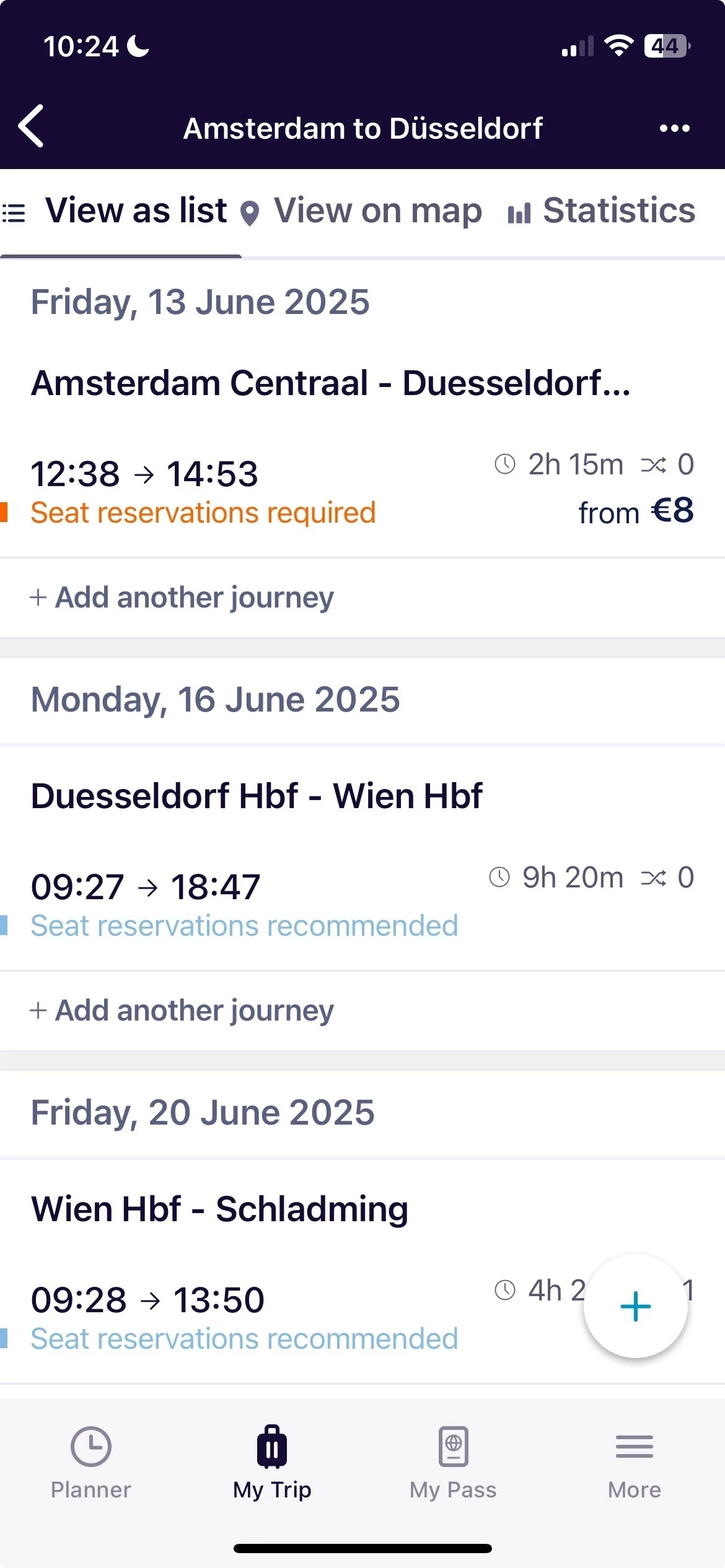
I have 7 journeys under the trip, Amsterdam to Dusseldorf. I should have called the trip, Europe as I am visiting 4 countries (covered by the 7 journeys). See screenshot below. The screenshot could not show all 7 journeys.
There are 2 passes. When I look at each pass, I can see the 7 journeys. Both passes are for 7 journeys to be travelled within a month.
Question: When I activate the passes, will I then be able see the button or slider to activate each journey ?
Hey @Joyce Reid! You don’t have to activate the Pass to connect a trip to a Pass.
Nevertheless, as your screenshot shows, you have created 3 trips: the 1st which is connected to Stanley’s Pass, the 2nd which is connect to your Pass, and a 3rd which is on its own and not connected to any Pass at all (Amsterdam to Dusseldorf). You can only have 1 trip per Pass, so the Amsterdam to Dusseldorf trip is not valid for generating a QR code (your ticket). You will have to add the journeys to both yours and Stanley’s trip (assuming you're both traveling together) to do that.
As to your second question, yes, once you’ve activated the Pass you’ll be able to activate a travel day and generate a QR code for each journey. However, it’s always best to wait until just before you board your first train for the day to activate your travel day, just in case there are issues, delays or you change your mind. That way, you don’t lose a travel day accidentally.
Hope this helps
I have added two passes to my mobile phone. However I have not activated the passes. I created a trip (Amsterdam to Dusseldorf) that has all my journeys started from Amsterdam to Dusseldorf and onto Austria and finally Zurich. It says the trip is not connected to a mobile Pass.
Is it because my pass it not activated? I will only start to use the Eurail rail on 13 June. Should I activate it say next week June 1 before I fly out Amsterdam? Just worried that my mobile pass will not work before I leave Canada on June 6.
Once the pass is activated, can I then activate each train journey individually to confirm that is the train I actually want to take? Do you activate each train journey under each mobile pass ( I have 2 passes)? Or do you activate each train journey under the trip folder?
So when I go to trip planner and select a journey, I will have to add the journey to both Stan and Joyce’s pass individually?
Do you need wifi to activate each journey or travel day? You said to activate each travel day just before you board the train.
What if at the station, you are informed there is delay or issues with the train you selected to travel on that day? I could have activated it by then. I gather you go to the planner and find another train…hopefully on the same day so I will not lose one travel day on my pass.
Thanks much for your help!
Not finding what you're looking for?
Don't be shy and let us know about your challenge.