Question

trip

  • August 28, 2026
  • 5 replies
  • 17 views

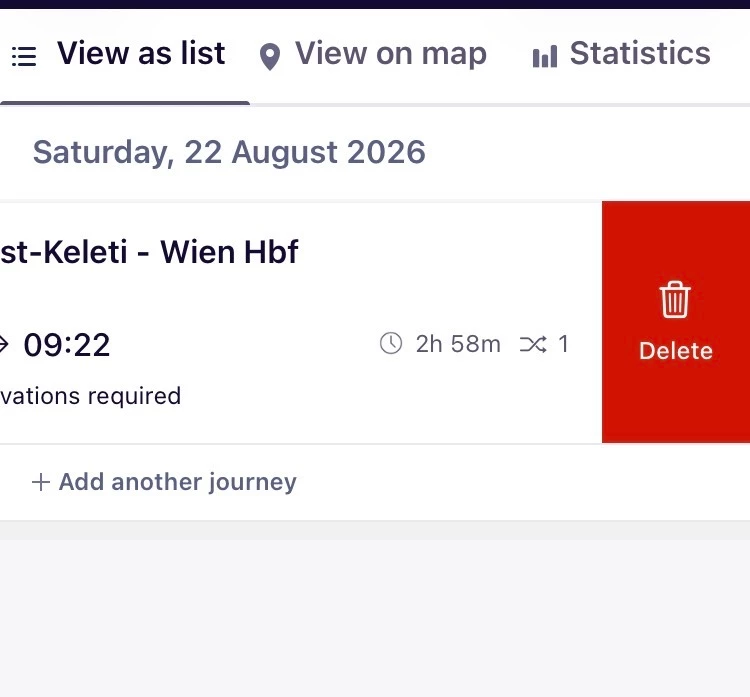
How can I remove a journey from "my trip" in the railplanner-app?

5 replies

Dagi
Railly clever
Forum|alt.badge.img+3
  • Railly clever
  • August 28, 2026

Touch the journey and slide it to the left. Then you’ll see the option “delete”


  • Author
  • Rail rookie
  • August 28, 2026

Thank you so much but it doesn'work. I only get "view details". Could it be because I have an android?


Marvin Heer
Engin-ius
Forum|alt.badge.img+8
  • Engin-ius
  • August 28, 2026

@Lena P You are also only able to delete journeys on days that have not yet passed. 

@Dagi I am only able to delete journeys by long pressing and then selecting delete in the menu that opens. Not by sliding them to the left. (is this a defference between the Android and IOS Version? i use Android)


  • Author
  • Rail rookie
  • August 28, 2026

Ah! That explained everything. Thanks to both.


Dagi
Railly clever
Forum|alt.badge.img+3
  • Railly clever
  • August 28, 2026

Thanks, ​@Marvin Heer, I have in fact IOS and thought it was the same for everyone 😅