We have global flexi passes. 4 days in 1 month. We will use 2 days to get to our destination and 1 day to get home. These are planned and saved in My Trip and added to My Pass (mobile) but not activated. We would like to use the remaining day for a trip out from our destination. We know the route of the journey but have not chosen the day. FAQ says Can I switch or cancel a travel day?
You can cancel your travel day any time before the start of that day (00:00 CET). Go to My Pass, choose the travel day you want to cancel and tap ‘Cancel travel day’.
But does not say how to change the travel day.

Solved
Change travel day
Best answer by BrendanDB
Yes, when you press the grey ledger of a journey, saved in "My trip" it will ask your confirmation ("Sure you want to activate a travel day?")
An example of my trip this summer:
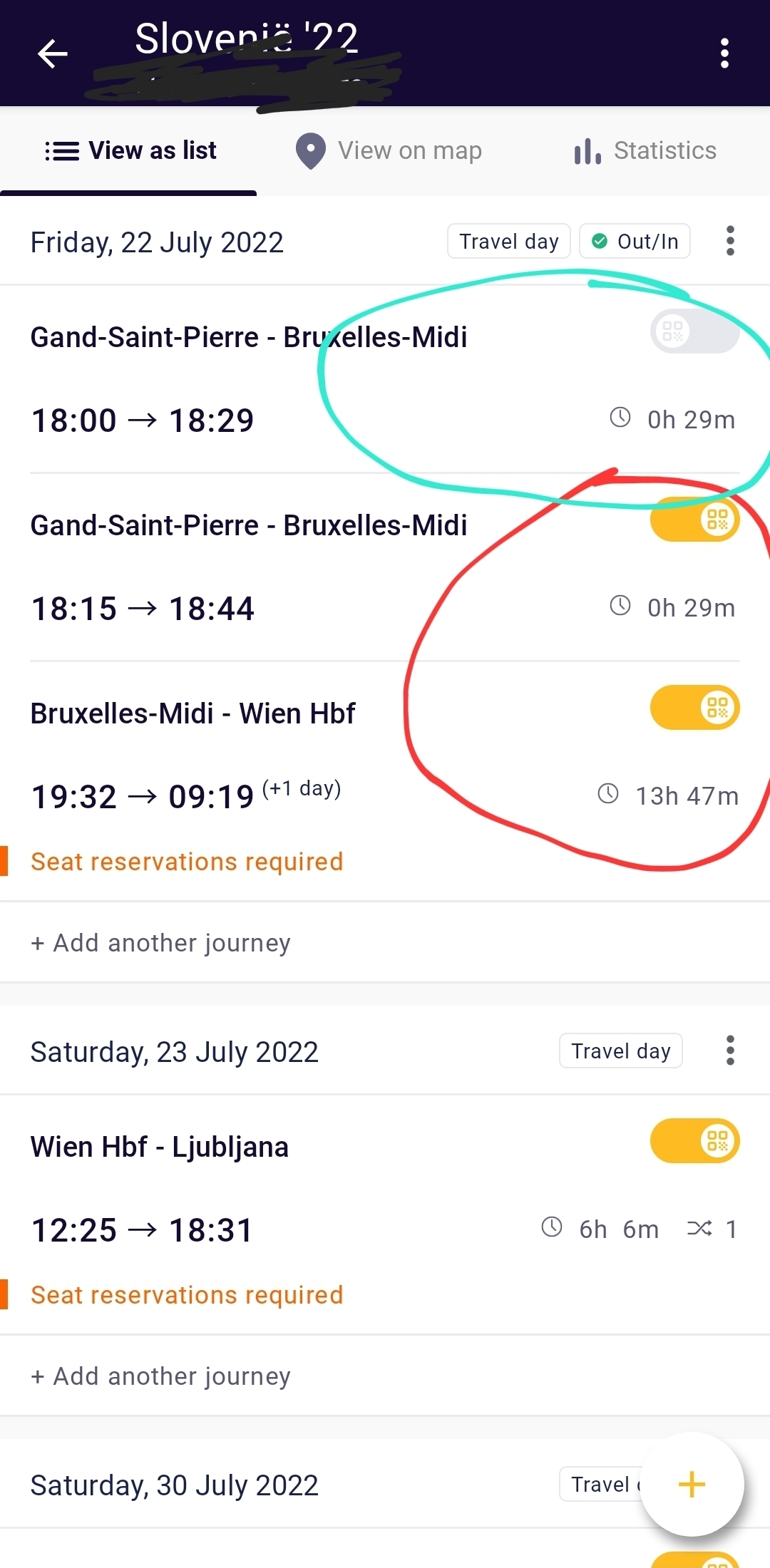
Circled in green are non - activated journeys that I've put in the planner. But I actually got a train later, that I activated before boarding. Then it asked if I wanted to activate a travel day. Then it generated a QR code in My Pass, that you'll need to show when inspected.
The effectively activated and used journeys are circled in red. Note the yellow ledger.




Login to the community
No account yet? Create an account
Social Login
Login with Eurail/Interrail accountEnter your E-mail address. We'll send you an e-mail with instructions to reset your password.