
Maybe it's a bug?

  • November 14, 2025
  • 7 replies
  • 82 views

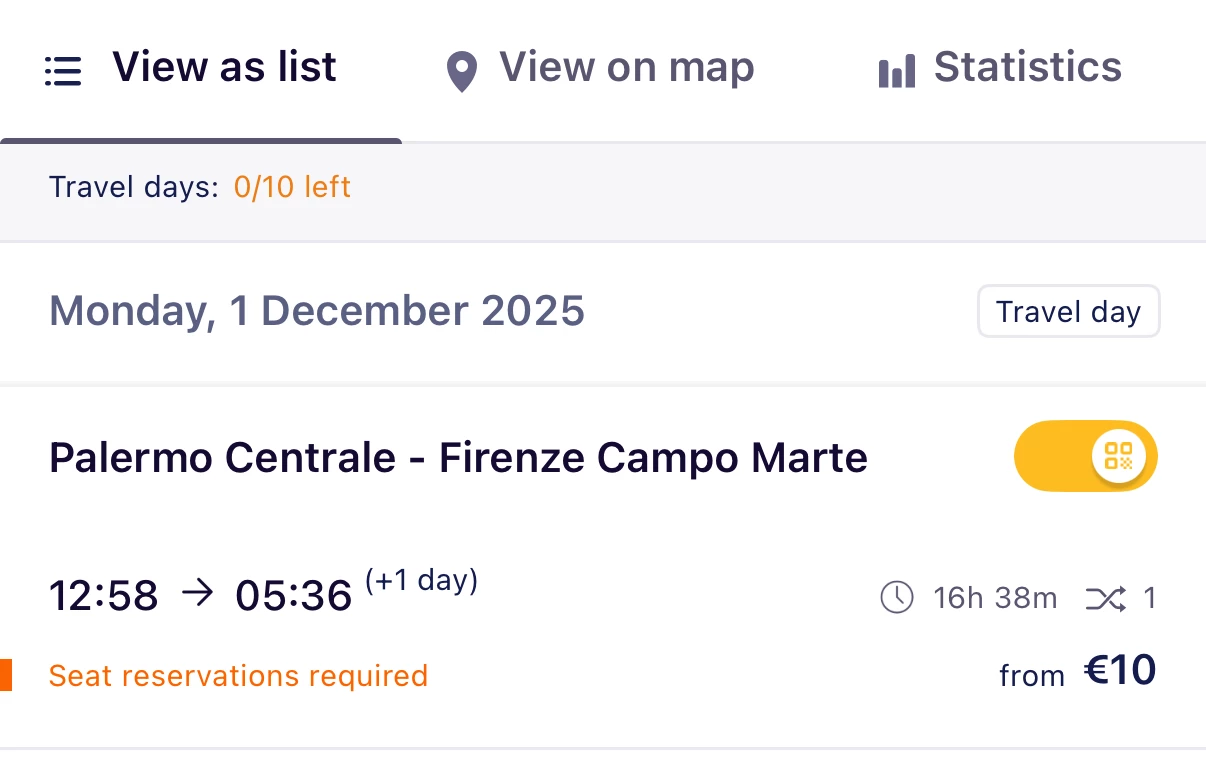
Hello. I'm starting my trip in Palermo on December 1st. After I entered my schedule into the app, I checked the image and it showed my trip starting on December 2nd. I was supposed to take a sleeper train to Milan on December 1st (departing at 12:58), but it seems to have been removed from my schedule. It also seems like the total kilometers traveled has been omitted from the calculation. I hope this will be fixed in an app update.


7 replies

Forum|alt.badge.img+10
  • Railmaster
  • November 14, 2025

Please report any bugs to customer service:

https://eurail.zendesk.com/hc/en-001/requests/new

I've seen more complaints recently that (some?) night trains seem to be excluded in the trip statistics, but I don't know whether customer support and the developers know about it. It might also be due to timezone differences.

In addition, you seem to have activated your pass and all your travel days. It is not a good idea to do this in advance. It's best only to activate your pass on any travel day on the day itself, because you cannot cancel activation once validity has started (midnight local time). So if anything unexpected happens, e.g. you wake up ill, you can't cancel anymore and you may loose travel days.

Further, the journey from Palermo to Firenze shows a change, but this is a direct train (that's a known timetable data problem on the Eurail side). In this case, it's not a problem in the app since it lets you change in Messina, which is also still on 1 December, so it doesn't take an extra travel day. If the change would be after midnight, the app would take an unjustified extra travel day and you should add the train manually.


  • Author
  • Full steam ahead
  • November 14, 2025

Thank you for your reply. As you pointed out, it is somewhat risky to plan for 10 days, but I don't have many opportunities to go to Europe due to schedules from Japan, so I will be careful. I will contact the site you told me about the bug.


Forum|alt.badge.img+1
  • Full steam ahead
  • November 14, 2025

It’s perfectly fine to plan everything in detail, but you should only activate the pass and “toggle” each train (thus activating a travel day) when you’re about to leave. 
You can still disactivate the pass until the day you are traveling.

This way, if something unexpected happens and you can’t travel, you can save your pass for later or get a refund 


Forum|alt.badge.img+10
  • Railly clever
  • November 14, 2025

Don't activate your pass and travel days in advance. If you for some reason can't travel, you can only deactivate the pass until midnight the day before the start of the validity of the pass. 


  • Author
  • Full steam ahead
  • November 15, 2025

Thank you for pointing out the issue of activating the pass. I guess it's better to do it that way since it's not a continuous pass. In any case, it doesn't change the fact that I should take care of my health when traveling.


Eurail Community Moderator
Forum|alt.badge.img+7

Hi ​@Sequential 

Did you report this to customer service? 
Camilo


  • Author
  • Full steam ahead
  • November 17, 2025

Not yet. I'll report back now.