Answer

planning my journey

  • December 29, 2024
  • 9 replies
  • 112 views

My journey is split in 2 days although it is same day. I’m going from Avignon to Paris and directly Paris to London.

Best answer by ralderton

Perform a search on Railplanner, and scroll down to the bottom of the search results. You’ll see the option to add a train manually.

9 replies

Forum|alt.badge.img+6
  • Full steam ahead
  • December 30, 2024

The first sentence doesn't make sense.

On a pass day (00:00 - 23:59) you may board as many trains as you'd like. It could be 1, 2 or 20. Still one pass day.

Note that seat reservations are mandatory on either route, Eurostar has a passholder quota so book ahead. The RER D between Gare de Lyon and Gare du Nord isn't included in Interrail/Eurail. You must arrive at Gare du Nord 45 min or so before departure for security and passport controls.

Last thing: if timetables match I might recommend taking an Avignon-Lille TGV so you avoid the station transfer hassle in Paris. Lille-Europe is also tiny -> you clear all checks in 30 sec. ;)


  • Author
  • Right on track
  • December 30, 2024

Thank you for your quick reply. What I meant by the first line is that when I added the second half of my trip under Journey it kept booking for the following day.

However, I do like your suggestion of going to Lille instead for more convenience and ease.

Thanks again and have a pleasant day.


  • Author
  • Right on track
  • December 30, 2024

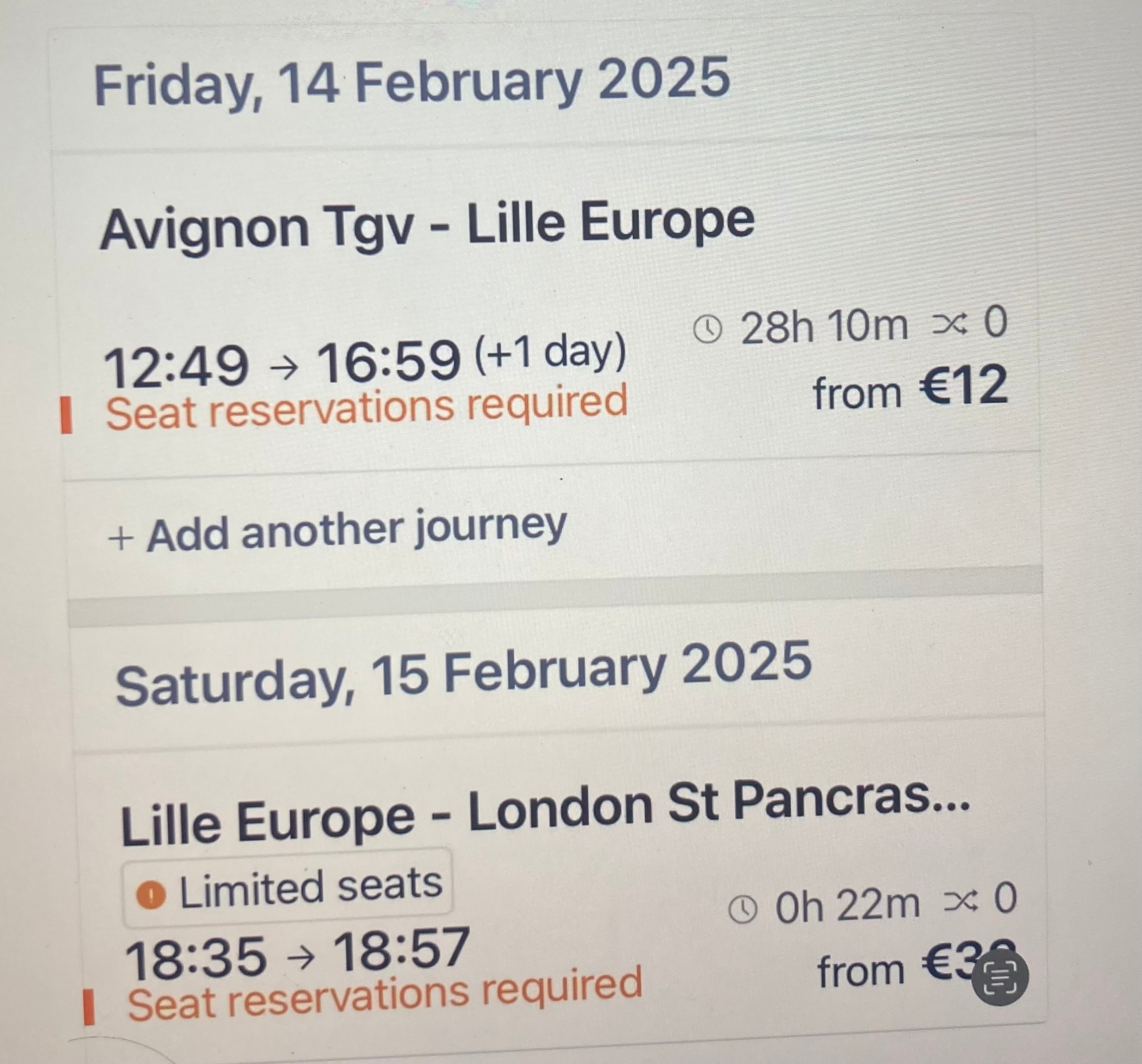
I took your advice and booked Avignon to Lille, Lille to London. On the app, it splits this trip in 2 days and lists the first leg as taking 28hrs

im attaching screenshot


ralderton
Railmaster
Forum|alt.badge.img+8
  • Railmaster
  • December 30, 2024

This will be an error in the data! It can’t take 28 hours to get from Avignon to Lille on a direct train. 

It takes 4 hours - somewhere the timetable has added 24 hours by mistake.

-

I can’t reproduce this problem on Railplanner. 

Obviously, you’ll arrive in Lille at 1659 on Friday. If the error isn’t fixed, you can as the train manually instead


  • Author
  • Right on track
  • December 30, 2024

Thanks again for answering so quickly. 
 

do you mean add the train manually on the app if error not fixed? If so, not sure how to do that, please help.


thanks.


ralderton
Railmaster
Forum|alt.badge.img+8
  • Railmaster
  • Answer
  • December 30, 2024

Perform a search on Railplanner, and scroll down to the bottom of the search results. You’ll see the option to add a train manually.


  • Author
  • Right on track
  • December 30, 2024

Thank you. Manual entry works perfect for 15 February, but not for 14 February- that’s the date of travel I want. Even when I enter the 14th it saves it for the 15th curious.

Can I purchase the ticket in person for this journey with the Eurail pass on the app?

thanks for your help and patience.


ralderton
Railmaster
Forum|alt.badge.img+8
  • Railmaster
  • December 31, 2024

A ticket counter can sell you seat reservations, but it can’t help you add the train to your app, and you need to do that before travel.

I’m not sure what the problem could be, or how to fix it. You might need to contact Eurail help for that. 


  • Author
  • Right on track
  • December 31, 2024

Thank you so much for all your help. Interestingly, today  I was able to add both trains manually for the correct date 14 February.

Hopefully all will be fine when I actually use it.

have a great day.